MLPipeAddBlock

 Function - Adds a Pipe Block to a pipe.
A Pipe contains an Input Pipe Block (Master, PMP, or Sampler), a Converter Output Pipe Block, and any Transformation Pipe Block that can be in between.
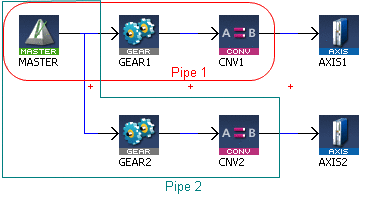
- The MLPipeAddBlock image shows two Pipes, both with the same Master Input Pipe Block.
- If Pipe 1 is created without using the Graphical Engine, these commands are used once a Pipe and the Pipe Blocks have been created:
- MLPipeAddBlock( PipeAXIS1, MASTER);
- MLPipeAddBlock( PipeAXIS1, MyGear);
- MLPipeAddBlock( PipeAXIS1, CNV1);
-
-
- All Blocks in the Pipe Network are added to a Pipe automatically.
- Code with MLPipeAddBlock commands are automatically generated and called in a program with PipeNetwork(MLPN_CREATE_OBJECTS).
- When using the Pipe Network graphical engine to create Pipe Blocks, the user does not have to manually add MLPipeAddBlock commands to the Project.
Inputs
|
Input |
Data Type See Data Types. |
Range |
Unit |
Default |
Description |
|---|---|---|---|---|---|
|
PipeID |
DINT |
1 to 1024 |
N/A |
No default |
ID number of a created Pipe object. |
|
BlockID |
DINT |
1 to 1024 |
N/A |
No default |
ID number of a created Pipe object to add to the selected Pipe. |
Outputs
|
Output |
Data Type See Data Types. |
Range |
Unit |
Description |
|---|---|---|---|---|
|
Default (.Q) |
BOOL |
FALSE, TRUE |
N/A |
|
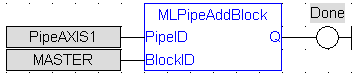
FBD Language Example
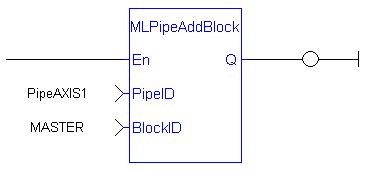
FFLD Language Example
IL Language Example
Not available.
ST Language Example
//Add a block to a pipe
MLPipeAddBlock( PipeAXIS1, MyGear );
See Also
- MLCNVConnect
- MLPipeAct
- MLPipeCreate
- MLPipeDeact
- Pipe Network Functions for the PLC - MLPN_CREATE_OBJECTS


