Project Settings dialog box
Usage
The Project Settings dialog box is used to define the project settings stored in the KAS project file and loaded when the project is opened.
See:
Access
 Click to view access to the dialog box
Either:
- Click the Project menu and select Settings.
- On the toolbar, click the
 button.
The Project Settings dialog box opens. (Figure 1)
Click to view the dialog box
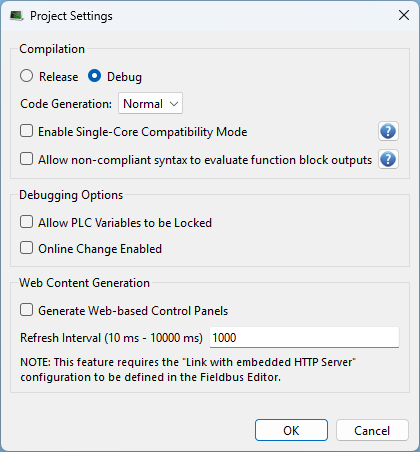
Dialog box Description
|
Section |
Element |
Description |
|---|---|---|
|
Compilation section |
Release option button |
The Compilation area is used to define parameters for the target. Select the Release option button:
|
|
|
Debug option button |
Select the Debug option button to use Step-By-Step Debugging during simulation or online testing. |
|
|
Code Generation drop-down |
Click the Code Generation drop-down arrow and select either Normal or Optimized. |
|
|
Enable Single-Core Compatibility Mode check box |
Select the Enable Single-Core Compatibility Mode check box if:
|
|
|
Allow non-compliant syntax to evaluate function block outputs check box |
Select the Allow non-compliant syntax to evaluate function block outputs check box if:
|
|
Debugging Options section |
Allow PLC Variables to be Locked check box |
|
|
|
Online Line Change Enabled check box |
|
|
Web Content Generation section |
Generate Web-based Control Panels check box |
Select the Generate Web-based Control Panels check box to allow access to control panel files in the project from the web browser using the KAS Web server. |
|
|
Refresh Interval text box |
In the Refresh Interval text box, specify the interval at which web pages are refreshed to receive PLC variable updates from the KAS Web server. |
|
|
OK button |
Click OK to save the changes or selections and close the dialog box. |
|
|
Cancel button |
Click Cancel to discard all changes or selections and close the dialog box. |


