Open topic with navigation
Remote Access to PLC Variables
The variable interface provides remote access to the PLC variables used in the application running on a controller ( or PDMM/PCMM). A remote application may be developed to read or write PLC variables from and/or to the controller using this interface. The interface design is based on HTTP, where a simple HTTP request can be used to read or write a set of PLC variables.
PLC variables on a PAC or PDMM/PCMM may be read/written by third-party software via an HTTP request. The read/write is synchronized with the PLC cycle and multiple variables may be read/written within a single request.
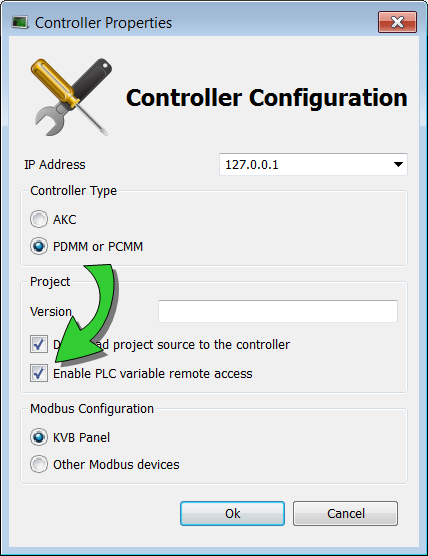
This option is disabled by default for security reasons. To use this function, select PLC variable remote access from the Controller Properties when Online Change is disabled.
The HTTP requests may be done as comma delimited text, or JSON (JavaScript Object Notation) format. This means that applications may be developed on any platform which supports HTTP, and in many different languages, e.g. Java, C#, and C++.
The URL and syntax for both reading and writing variables is (controller URL)/kas/plcvariables&format=<MIME type>.
The plain text syntax for getting or putting variables is as follows.
| GET |
<var1>,<var2> |
http://198.51.100.0/kas/plcvariables?
MachineSpeed,projST.LocalVariable |
| PUT |
<var1>=<val1>,<var2>=<var2> |
http://198.51.100.0/kas/plcvariables?
MachineSpeed=100.000000,projST.
LocalVariable='SampleString' |
|
|
Copyright © 2015 Kollmorgen™
|
|

|
Open topic with navigation
 The PLC"Programmable Logic Controller"
A Programmable Logic Controller, PLC, or Programmable Controller is a digital computer used for automation of industrial processes, such as control of machinery on factory assembly lines.
Used to synchronize the flow of inputs from (physical) sensors and events with the flow of outputs to actuators and events variable interface provides remote access to the PLC variables used in the application running on a controller (PAC"Programmable Automation Controller"
PAC is a compact controller that combines the features and capabilities of a PC-based control system with that of a typical programmable logic controller (PLC). A PAC thus provides not only the reliability of a PLC, but also the task flexibility and computing power of a PC. Additionally, because they function and communicate over popular network interface protocols, PACs are able to transfer data from the machines they control to other machines and components in a networked control system or PDMM/PCMM). A remote application may be developed to read or write PLC variables from and/or to the controller using this interface. The interface design is based on HTTP, where a simple HTTP request can be used to read or write a set of PLC variables.
The PLC"Programmable Logic Controller"
A Programmable Logic Controller, PLC, or Programmable Controller is a digital computer used for automation of industrial processes, such as control of machinery on factory assembly lines.
Used to synchronize the flow of inputs from (physical) sensors and events with the flow of outputs to actuators and events variable interface provides remote access to the PLC variables used in the application running on a controller (PAC"Programmable Automation Controller"
PAC is a compact controller that combines the features and capabilities of a PC-based control system with that of a typical programmable logic controller (PLC). A PAC thus provides not only the reliability of a PLC, but also the task flexibility and computing power of a PC. Additionally, because they function and communicate over popular network interface protocols, PACs are able to transfer data from the machines they control to other machines and components in a networked control system or PDMM/PCMM). A remote application may be developed to read or write PLC variables from and/or to the controller using this interface. The interface design is based on HTTP, where a simple HTTP request can be used to read or write a set of PLC variables.


