|
Name |
Description |
|---|---|
|
Initializes a synchronizer Pipe Block. |
|
|
Starts a synchronization of a synchronizer Pipe Block. |
|
|
De-synchronizes a synchronizer Pipe Block. |
|
|
Sets the output phasing value of a synchronizer block. |
Purpose
 Click to view the Purpose of Synchronizer
The Synchronizer is used to de-synchronize and re-synchronize an axis to an internal or external master like a mechanical clutch / brake.
- It is used where a slave axis must be stopped and, when restarted, achieve perfect, jerk-free re-synchronization with the master.
- The ramping distance (increment of slave axis motion within which ramp up or ramp down occurs) and the slave axis resting position are adjustable.
Example of Synchronizer Pipe Block
Such a pipe block can be used, for instance, when an item is missing on a conveyor.
Figure below illustrates the application of a Synchronizer which enables a slave axis to be stopped, started and re-synchronized to an external master.
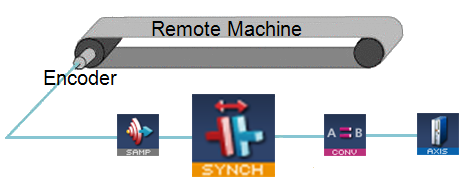
Figure 1: Synchronizer Pipe Block to Start, Stop and Re-synchronize a Slave Axis
Parameters
Click to view Parameters for Synchronizer
|
Parameter |
Description |
|---|---|
|
ModuloPosition |
|
|
CurveType |
When synchronizing, specifies which type of curve (parabolic or polynomial) has to be implemented for merging with the master. The options are:
|
|
DeltaS |
|
Example: Synchronizer Functions
Click to view Synchronizer Function examples
- When MLSyncStart function is called, the output value is adapted to catch up with the input value.
- The OUTPUT_PHASING parameter is used to define a curve in order to smooth the output value. (Figure 2)
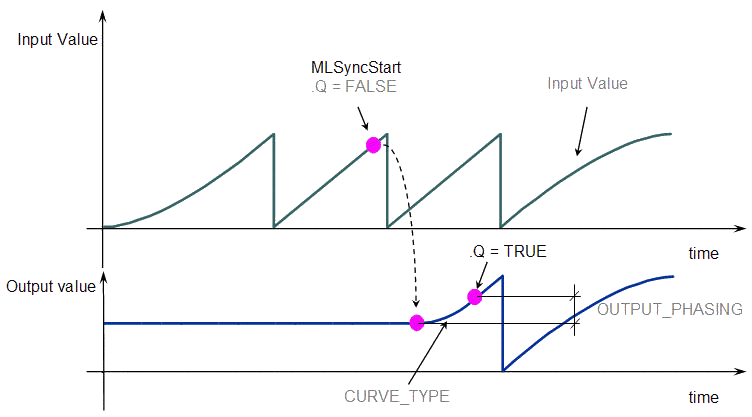
Figure 2: Get Output Phasing after MLSyncStart
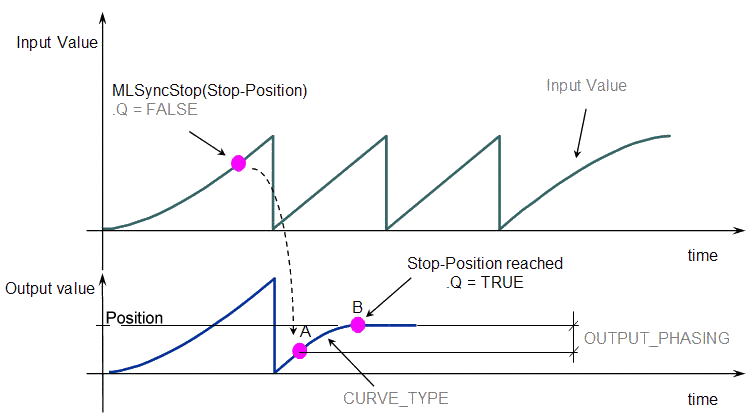
- When the MLSyncStop function is called, the output value is adapted according to the specified Stop-Position (point B).
- The OUTPUT_PHASING parameter is used to define point A, where the flow follows a curve in order to smooth the output value. (Figure 3)
Associated Data
- OutputValue: Output value of the data flows.
- IsReady: Boolean set to TRUE when the pipe block is ready.


