The Backup operation discovers all the devices on the EtherCATEtherCAT is an open, high-performance Ethernet-based fieldbus system. The development goal of EtherCAT was to apply Ethernet to automation applications which require short data update times (also called cycle times) with low communication jitter (for synchronization purposes) and low hardware costs network and stores the topology information, AKD firmware files, and AKD parameters to the controller’s local storage.
Before starting a backup of the EtherCAT Devices, you will need:
AKD-Firmware-for-KAS-Vxx-xx-xx-xxx.tgz. This package is included in the KAS software installation directory (\Program Files (x86)\Kollmorgen\Kollmorgen Automation Suite\Astrolabe\DrivesFW) or is available for download from the Kollmorgen website. Make sure the devices are in the order as expected. The topology information is stored in the backup and is used to check for identical topology during a restore function.
The PLC application cannot be running and the IDE"Integrated development environment" An integrated development environment is a type of computer software that assists computer programmers in developing software. IDEs normally consist of a source code editor, a compiler and/or interpreter, build-automation tools, and a debugger must not be in Online Configuration Mode. Please stop your PLC application or disable Online Configuration Mode before a Backup or Restore.
The web server will ask you to choose a firmware package file and suggest the filename that matches the firmware version on your drives. Selecting the firmware package file is a one-time event. The controller will remember your selection and will not ask you again for future backups.
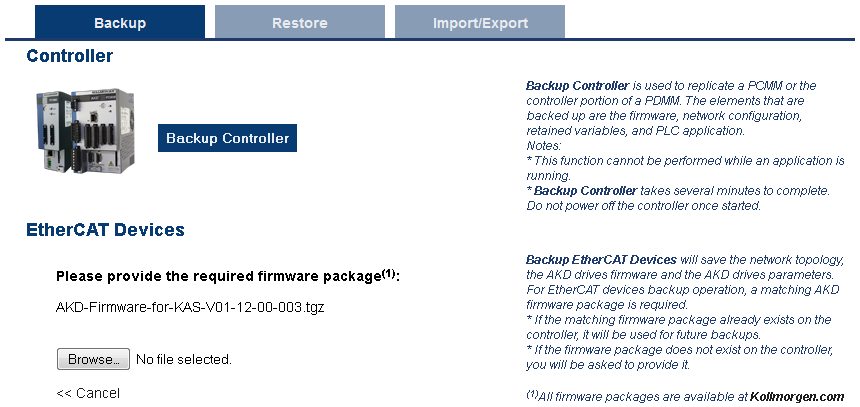
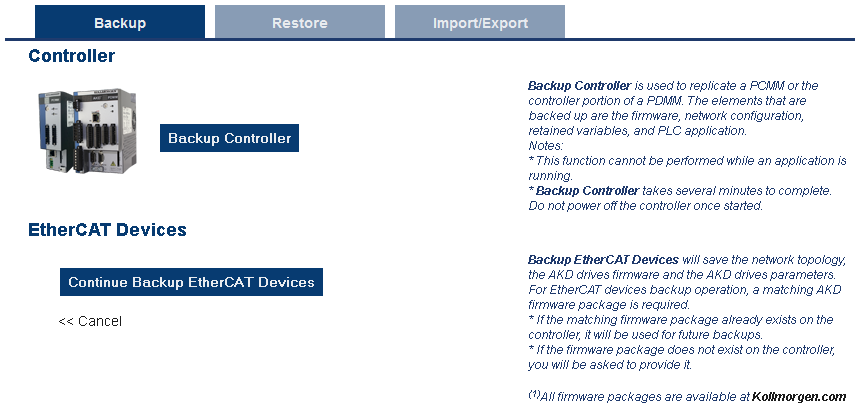
When the backup is complete, the web server will indicate whether the backup was successful.
After the backup is complete, it is a good idea to export the backup to an off-site location for safe keeping. See Export/Import EtherCAT Devices Backup.
|
Copyright © 2015 Kollmorgen™ |
|
